Calendar & Reminder Alarms1.5
Publisher Description
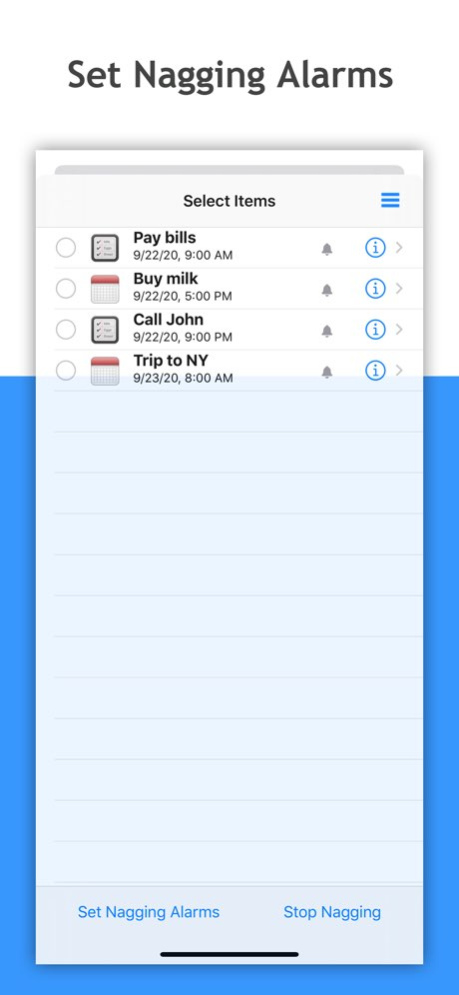


Alarm Helper will repeat alarms for events and tasks. At the scheduled time, your iPhone or iPad will play this alarm until you take action.
Alarm Helper is an add-on to the built-in Calendar and Reminders app. All activities are synced with your Calendar and Reminders.
Feature List:
Repeat event alerts and task alerts; ;
View alerts and dismiss alerts;
Customize sorting and filtering;
Show days-until for events;
Create or edit events and tasks;
Sync with your built-in Calendar and Reminders;
*****************************************
How to set nagging alarms?
1. Tap 'Set Alarm' button.
2. Select one or multiple events or tasks.
3. Tap ‘Set Nagging Alarm’ button and Configure the nag time and interval.
The basic version only has default alert settings. If you want to change settings, please upgrade to ‘Alarm Reminder Package’ and ‘Alarm Calendar Package’.
Version History Bug fixes and performance improvements. 1.5 09/22/2020 Redesigned Calendar View 1.4 06/02/2016 With our App Extension, you can dismiss alarm under the Notification Center's Today view.
iOS8 compatibility fixes. 1.3 04/07/2015 Fix bug 1.2 10/02/2013 Fix bug 1.1 06/12/2013 1.0 05/09/2013
About Calendar & Reminder Alarms
The company that develops Calendar & Reminder Alarms is Shan Shan Liu. The latest version released by its developer is 1.5.
To install Calendar & Reminder Alarms on your iOS device, just click the green Continue To App button above to start the installation process. The app is listed on our website since 2026-10-14 and was downloaded 31 times. We have already checked if the download link is safe, however for your own protection we recommend that you scan the downloaded app with your antivirus. Your antivirus may detect the Calendar & Reminder Alarms as malware if the download link is broken.
How to install Calendar & Reminder Alarms on your iOS device:
- Click on the Continue To App button on our website. This will redirect you to the App Store.
- Once the Calendar & Reminder Alarms is shown in the iTunes listing of your iOS device, you can start its download and installation. Tap on the GET button to the right of the app to start downloading it.
- If you are not logged-in the iOS appstore app, you'll be prompted for your your Apple ID and/or password.
- After Calendar & Reminder Alarms is downloaded, you'll see an INSTALL button to the right. Tap on it to start the actual installation of the iOS app.
- Once installation is finished you can tap on the OPEN button to start it. Its icon will also be added to your device home screen.
Program Details
System requirements
Download information
Pricing
Version History
version 1.5
posted on 2026-10-14
Version History Bug fixes and performance improvements. 1.5 09/22/2020 Redesigned Calendar View 1.4 06/02/2016 With our App Extension, you can dismiss alarm under the Notification Center's Today view.
iOS8 compatibility fixes. 1.3 04/07/2015 Fix bug 1.2 10/02/2013 Fix bug 1.1 06/12/2013 1.0 05/09/2013
version 1.5
posted on 2020-09-22
Sep 22, 2020 Version 1.5
Bug fixes and performance improvements.
version 1.5
posted on 2020-09-22
Bug fixes and performance improvements.
version 1.4
posted on 2016-06-02
Jun 2, 2016 Version 1.4
Redesigned Calendar View
version 1.4
posted on 2013-05-09
version 1.5
posted on 1970-01-01
2020年9月22日 Version 1.5
Bug fixes and performance improvements.
version 1.5
posted on 1970-01-01
22 set 2020 Version 1.5
Bug fixes and performance improvements.
version 1.5
posted on 1970-01-01
22 сент. 2020 г. Version 1.5
Bug fixes and performance improvements.
version 1.4
posted on 1970-01-01
2016年6月2日 Version 1.4
Redesigned Calendar View
